


DYMO Compatible Labels- Size and Printer Compatibility Guide
DYMO compatible labels should be matched to the exact LabelWriter or other DYMO printer model, not selected from the brand name alone. Label dimensions, roll or cassette format, core or holder design, sensing marks, material and adhesive can differ across product families. Alliance Paper lists labels for DYMO printers, and every compatibility statement should be tied to a verified model and label format. Compatible also does not mean OEM or identical to DYMO-branded media.
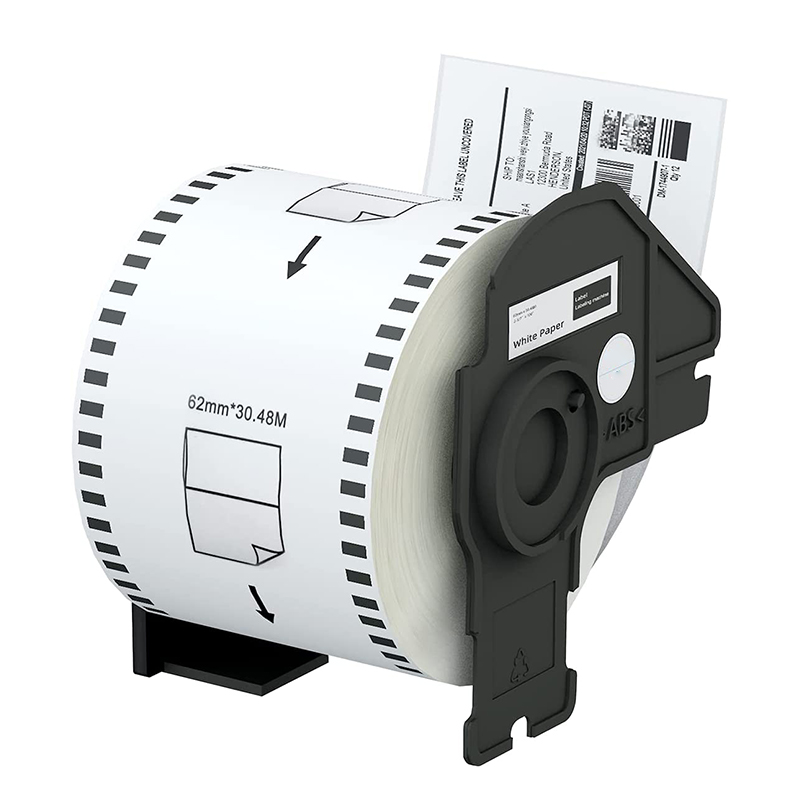
A compatible label must match the exact printer model, media format, dimensions and sensing design.
What should buyers verify before describing a roll or cassette as DYMO compatible labels for a specific printer and application?
- Which Printer and Label Identifiers Should Be Collected?
- How Do Material and Application Affect Compatibility?
- What Is the Recommended Compatibility Test?
- Conclusion
- Frequently Asked Questions
- Are all DYMO LabelWriter labels interchangeable?
- Do DYMO-compatible labels need a ribbon?
- Why do marks or holes matter?
- Does compatible mean original DYMO labels?
- What should a buyer send for confirmation?
Start with the complete printer model printed on the device. Similar LabelWriter names can represent different generations or media systems. The official manual or support page should define the supported label types and loading method.
Record the current label's product or reference number when available. Measure label width and length, gap or indexing marks, liner width and the roll or cassette geometry. Photos of the current packaging and installed media can prevent confusion.
Some label systems use marks or holes to control label position and count. The location and pattern of those features may be as important as face size. A label can physically load but still fail to feed or index correctly.
Use the DYMO official support area to locate model documentation, then compare it with the current Alliance Paper Dymo labels page.
Exact printer model and, where available, current label reference number.
Label width, length, liner width and feed direction.
Roll, core, holder or cassette geometry.
Gap, marks, holes or other indexing features.
Many LabelWriter applications use direct thermal media, so the label needs the correct heat-sensitive construction. Thermal sensitivity and printer settings affect darkness and barcode quality. Confirm that the exact printer is designed for the proposed media type.
Adhesive selection depends on the application surface, not the printer. Address labels, file labels, barcode labels and shipping labels may be applied to paper, cardboard, plastic or other substrates. Surface texture, cleanliness, curvature and storage conditions can change adhesion.
Label shape and matrix removal affect feeding and dispensing. Rounded corners, die-cut tolerance and liner stiffness may matter in compact printer paths. Test the production construction rather than relying only on a dimensional drawing.
Alliance Paper's broader printer label category includes several finished label directions. Use the exact Dymo product route when requesting a model-specific sample and avoid mixing it with a general roll label specification.
Thermal coating and print response for the specific device.
Adhesive matched to envelope, file, carton, plastic or other surface.
Die-cut shape, liner and indexing features.
Expected handling, scanning and readable period.
Install the sample according to the printer instructions and run any required calibration. Print the normal template with its smallest text, barcode or QR code, graphics and margins. Check alignment across several consecutive labels.
Observe feeding, indexing, cutting or tearing and any error messages. Repeated feed accuracy matters more than one successful label. If the media uses a holder or cassette, confirm that it seats correctly and does not create excess resistance.
Apply the printed labels to the real substrate and check adhesion, edge lift, print contrast and scanning after normal handling. Retest when the application surface or environmental conditions change.
Record the approved printer model, label reference, dimensions and construction on the quotation. Do not extend one successful test to every DYMO model or present the product as official DYMO media.
Run multiple labels with the real print template.
Check feed, indexing, alignment, cutting and printer errors.
Test adhesion and scanning on the final surface.
Limit compatibility language to verified models and formats.
DYMO compatible labels require a match across printer model, media format, sensing, thermal response, dimensions and application. A similar shape or roll appearance is not enough.
Document the exact tested combination and state clearly that compatible media is not OEM unless that status is separately verified. DYMO and LabelWriter are trademarks of their respective owner.
No. Supported sizes, media systems and indexing features can vary by model and generation.
Many LabelWriter applications use direct thermal media without a ribbon, but the exact printer and label system must be confirmed.
Some printers use them to identify label position or count. Incorrect sensing features can cause feeding and alignment errors.
No. Compatible media is third-party media intended to work after verification; it does not mean OEM or affiliated.
Send printer model, current label reference, dimensions, roll or cassette photos, application surface, quantity and a sample if possible.
Review the Alliance Paper Dymo labels page and send the exact printer model and current label reference for sample verification.


